K8Studio: YAML Compare for Kubernetes Objects
When you are troubleshooting drift, validating a rollout, or trying to understand why two resources behave differently, raw YAML inspection is often the fastest path. K8Studio includes a built-in YAML compare view so you can select two Kubernetes resources and inspect their manifests side by side, with the important differences highlighted instead of buried in manual copy-paste work.
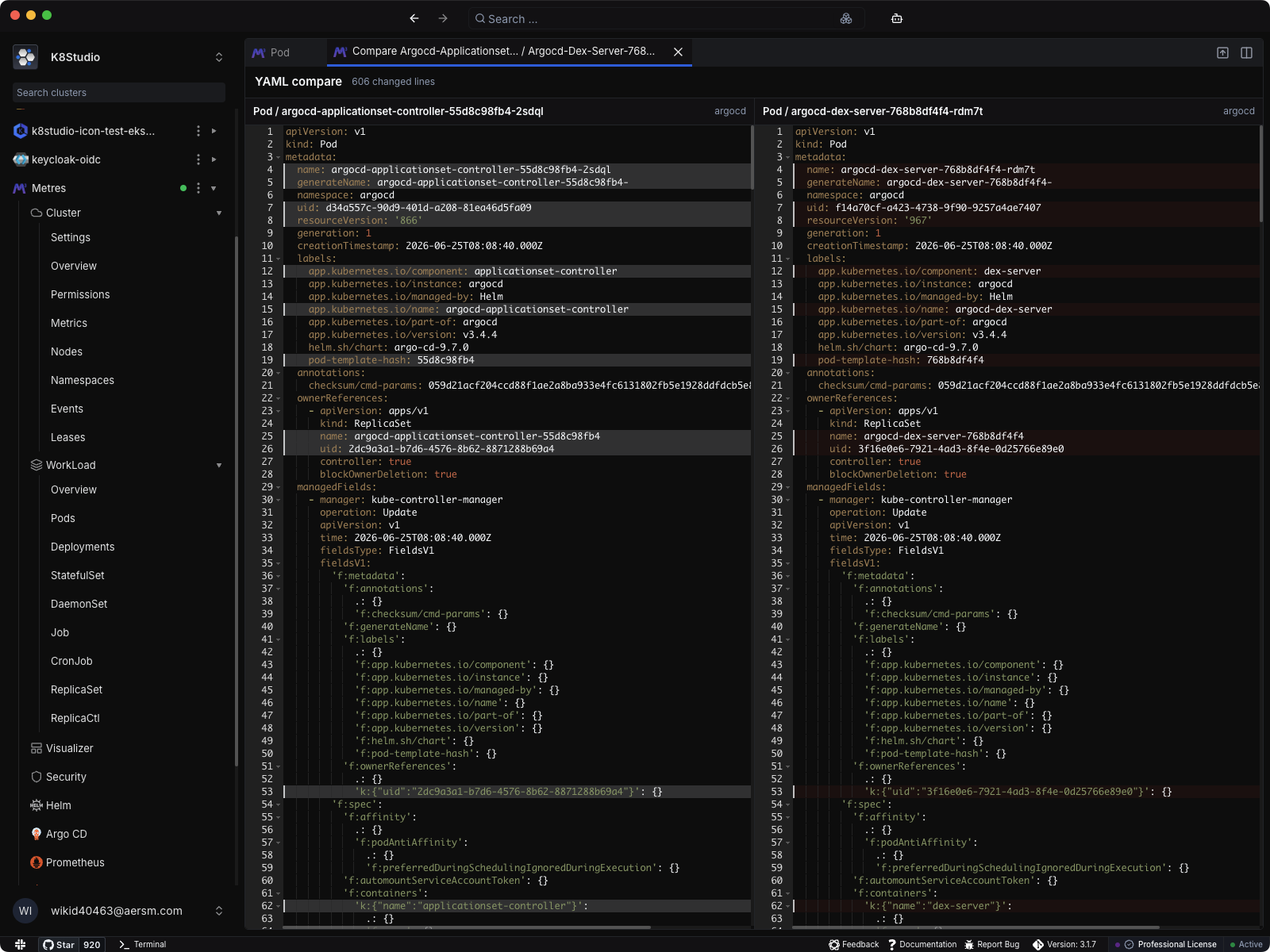
K8Studio’s YAML compare view is designed for real cluster investigation. From the grid, select exactly two resources and open the compare action. K8Studio resolves both objects, converts them to YAML, and opens a dedicated side-by-side comparison tab in the workbench.
What the compare view shows
- Two objects side by side: Review both Kubernetes resources in parallel instead of jumping between tabs or exporting files into an external diff tool.
- Highlighted line differences: Changed rows are marked directly in each editor so you can see what was added, removed, or changed at a glance.
- Changed-line summary: The compare header shows how many lines differ, which helps you quickly estimate whether you are looking at a small override or a major configuration gap.
- Resource title and namespace context: Each side shows the object type, resource name, and namespace so you always know exactly what you are comparing.
- Synchronized scrolling: Both YAML panes stay aligned while you scroll, making long manifest comparisons much easier to follow.
Why this helps in daily Kubernetes work
- Find configuration drift faster: Compare two Pods, Deployments, or other resources and immediately see why one behaves differently from the other.
- Validate rollouts and generated manifests: Inspect the resulting object definitions after changes and confirm the fields you expected to change are the ones that actually changed.
- Reduce copy-paste troubleshooting: Stay inside K8Studio instead of exporting YAML into external editors just to run a visual diff.
- Make object-level debugging clearer: Spot differences in labels, annotations, container specs, affinity rules, environment variables, security context, and other manifest details without manually scanning line by line.
Built for the workbench, not as an afterthought
YAML compare fits into the same desktop workflow as the rest of K8Studio. You can inspect cluster state in the grid, select two resources, open the compare view, and keep debugging without losing context or leaving the app.